
Download Colorway – AI coloring book generator, creative illustration tool
Overview
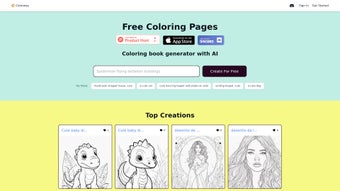
Colorway AI is a web‑based application that turns simple text prompts into personalized coloring‑book illustrations using cutting‑edge artificial intelligence. The concept is straightforward: type a phrase, sentence, or even a whimsical idea, and the engine produces a line‑art drawing ready for coloring. This makes the platform an excellent choice for artists, educators, parents, and anyone looking to spark imagination without needing advanced drawing skills. Because it runs entirely in the browser, users can access Colorway from any device with an internet connection—whether they’re on a desktop computer, a tablet, or a smartphone. The service supports a wide array of prompt styles, from “a cozy cottage in a snow‑covered forest” to “a futuristic robot playing chess with a cat,” delivering diverse and often surprising results. In addition to the on‑the‑fly generation, Colorway maintains a curated gallery of top user creations, offering inspiration and showcasing the breadth of what the AI can produce. This gallery includes themes such as animals, historical figures, pop‑culture references, and abstract concepts, illustrating the tool’s versatility. Whether you want to create a custom coloring book for a classroom activity, develop a unique gift for a child, or simply unwind with a relaxing creative pastime, Colorway provides a secure, free‑to‑try environment that encourages experimentation. The interface is designed with simplicity in mind: a clean input field, a “Generate” button, and instant preview of the line drawing. Users can download the final illustration as a high‑resolution PNG or SVG, print it, or share it directly on social media. With regular updates that improve image fidelity and expand the AI’s visual vocabulary, Colorway remains a fresh and engaging platform for continuous artistic exploration.Key Features
- Prompt‑Driven Illustration: Convert any textual description into a detailed line‑art image suitable for coloring.
- AI‑Powered Creativity: Utilizes advanced deep‑learning models that understand context, composition, and style.
- Instant Generation: Receive a finished illustration within seconds, allowing rapid iteration.
- High‑Resolution Export: Download results as PNG or scalable SVG for print‑quality projects.
- Cross‑Platform Access: Fully web‑based, works on Windows, macOS, Linux, Android, and iOS browsers.
- Curated Inspiration Gallery: Explore top community creations organized by theme, style, and popularity.
- Customizable Line Thickness: Adjust stroke weight before download to suit different coloring mediums.
- Secure & Private: No personal data is stored; prompts are processed anonymously.
- Free Tier with Optional Premium Upgrades: Access basic generation for free; unlock higher‑resolution outputs and priority processing with a modest subscription.
- Regular Content Updates: New style packs and prompt suggestions added monthly to keep the experience fresh.
The feature set is deliberately crafted to balance power and simplicity. While professional illustrators may appreciate the ability to fine‑tune line weight and export vector files, casual users will love the immediacy of a one‑click generation and the inspiration drawn from the community gallery. The platform’s AI model has been trained on a diverse dataset that includes classic children’s book illustrations, modern graphic novel aesthetics, and traditional line‑drawing techniques, ensuring that the output can match a wide range of artistic preferences.
Moreover, because the service runs in the cloud, users never need to install heavyweight software or manage GPU resources on their local machines. This makes Colorway an ideal tool for classrooms with limited hardware, for traveling families who rely on tablets, and for remote teams collaborating on creative projects. The optional premium tier is priced competitively and provides benefits such as batch generation, higher‑resolution SVG files, and early access to experimental style modules—features that are particularly valuable for educators creating printable workbooks or for small businesses seeking unique branding assets.
Installation & Usage Guide
Getting started with Colorway AI is intentionally frictionless. Because the application is entirely web‑based, there is no traditional “installation” process. Follow these steps to begin creating your own coloring‑book illustrations:
- Open a Supported Browser: Launch Chrome, Firefox, Edge, Safari, or any modern browser on your device.
- Navigate to the Official Site: Go to https://colorway.ai. The homepage presents a clean layout with a prominent text input field.
- Create an Account (Optional): While you can generate images anonymously, signing up with an email or social login unlocks the ability to save prompts, access the personal gallery, and receive priority processing if you upgrade to premium.
- Enter Your Prompt: Type a description such as “a dragon flying over a lavender field” or “a Victorian house surrounded by roses.” Be as detailed or as vague as you like—the AI will interpret the core elements.
- Adjust Settings (Optional): Use the “Line Thickness” slider to make strokes thicker for younger children or finer for intricate coloring. Choose a style preset if you want a specific artistic feel (e.g., “storybook,” “comic,” “mandala”).
- Generate the Illustration: Click the “Generate” button. The AI processes the prompt and displays a preview within 5–10 seconds.
- Review & Refine: If the result isn’t exactly what you imagined, tweak the prompt or adjust settings and generate again. The system retains a history of the last five attempts for quick comparison.
- Download or Share: Once satisfied, click “Download PNG” for raster use or “Download SVG” for vector editing. You can also share the image directly to Facebook, Instagram, or Pinterest using the built‑in share icons.
- Print & Color: Print the downloaded file on standard A4 or Letter paper, or import the SVG into a design program for custom sizing. Now you have a ready‑to‑color page!
For power users, Colorway offers a simple API key that can be obtained from the user dashboard. This API enables batch generation of images for educational institutions or small publishing houses, allowing integration with existing content‑creation pipelines. The documentation provides clear endpoints, request‑body examples, and rate‑limit guidelines.
Additionally, the platform includes a “Help” section with video tutorials, a searchable knowledge base, and community forums where users share prompt ideas and coloring tips. Should you encounter any technical issues, the support team can be reached via a built‑in chat widget, ensuring a quick resolution without leaving the application. Overall, the user experience is designed to be intuitive, with minimal learning curve, making it accessible to children as young as six, while still offering depth for adult creators.
Compatibility, Pros & Cons
Colorway AI is a cloud‑native solution that runs on any device capable of supporting modern web standards. This includes Windows 10/11, macOS Ventura and later, Linux distributions with a recent browser, as well as Android 8.0+ and iOS 13+. Because all processing occurs on remote servers, the local hardware requirements are modest—only a stable internet connection and a browser that supports WebGL for faster rendering. The responsive design automatically adjusts the layout for desktop, tablet, and mobile screens, ensuring a consistent experience across form factors.
Pros
- Instant, high‑quality line‑art generation from simple text.
- No download or heavy installation required; works in any modern browser.
- Free tier provides ample functionality for casual users.
- Export options include both raster (PNG) and vector (SVG) formats.
- Curated gallery offers endless inspiration and community engagement.
- Adjustable line thickness and style presets for tailored results.
- Secure, anonymous processing of prompts with no personal data storage.
- Regular updates introduce new artistic styles and improve AI accuracy.
- API access for bulk generation and integration with external workflows.
- Responsive design works equally well on desktops, tablets, and smartphones.
Cons
- Reliance on internet connectivity; offline use is not possible.
- Free tier limits the maximum resolution of exported files.
- Complex prompts may occasionally produce ambiguous or overly abstract images.
- Premium subscription required for batch processing and priority queue.
- Limited direct editing tools; users must rely on external software for post‑processing.
Rating: 4.5/5
Colorway AI delivers a delightful blend of creativity and convenience. Its AI‑driven prompt system is surprisingly intuitive, and the instant generation makes it perfect for spontaneous projects. While the free tier’s resolution cap can be limiting for professional print work, the affordable premium upgrade removes most barriers. Overall, it’s a standout tool for anyone interested in producing custom coloring pages without mastering drawing software.
Frequently Asked Questions
Is Colorway AI completely free to use?
Colorway offers a generous free tier that allows unlimited prompt submissions and standard‑resolution downloads. Premium features such as higher‑resolution SVG exports, batch API access, and priority processing are available through a monthly subscription.
Can I use Colorway on a mobile device?
Yes. Because Colorway runs in the browser, it works on any smartphone or tablet with a modern browser, including Android and iOS devices. The interface automatically adapts to smaller screens for a smooth experience.
What file formats are available for download?
Users can download their illustrations as PNG for raster use or SVG for scalable vector graphics. SVG files are ideal for editing in design programs or printing at larger sizes without loss of quality.
How does Colorway protect my privacy?
All prompts are processed anonymously on secure servers, and no personal data is stored unless you create an account for saved galleries. The platform complies with GDPR and other major privacy regulations.
Can I integrate Colorway into my own app or website?
Yes. Colorway provides a RESTful API with documentation available in the user dashboard. Developers can generate images programmatically, making it suitable for educational platforms, publishing pipelines, or creative games.
Conclusion & Call to Action
Colorway AI stands out as a versatile, user‑friendly solution for turning imagination into tangible coloring‑book pages. Its AI‑driven prompt system lowers the barrier to artistic creation, while the web‑based architecture guarantees accessibility across all major operating systems. Whether you’re a teacher looking for fresh classroom activities, a parent seeking a fun, screen‑free pastime, or an indie publisher needing unique line art, Colorway provides the tools to deliver quickly and affordably.
The free tier is generous enough for casual experimentation, and the optional premium plan unlocks advanced capabilities for professionals. Ready to unleash your creativity? Download Colorway now, generate your first illustration, and join a growing community of creators who are redefining how we think about digital coloring books.



.png)



